If you're not already billing manager for the organization, an organization owner at your client will need to add you to the organization as a billing manager. See Adding a billing manager to your organization.
Renewing a client's paid plan
If your client's organization already has a valid payment method, the plan will automatically renew at the start of each billing cycle. Otherwise, you or the client will need to add a payment method.
-
In the upper-right corner of any page on GitHub, click your profile picture, then click Settings.
-
In the "Access" section of the sidebar, click Organizations.
-
Select an organization by clicking on it.
-
Under your organization name, click Settings. If you cannot see the "Settings" tab, select the dropdown menu, then click Settings.

-
If you are an organization owner or billing manager, in the "Access" section of the sidebar, click Billing and licensing.
-
At the top of the page, click Payment information .

-
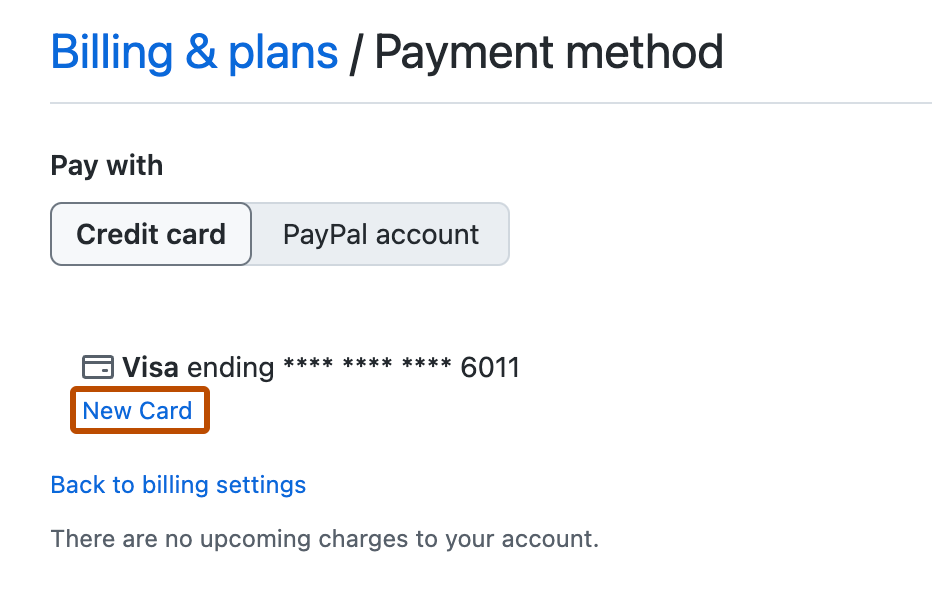
Under "Payment method", click New Card.
-
Under "Payment method", choose to pay with a credit card or PayPal.
-
Complete the payment information form, then click Submit.



Upgrading the number of paid seats
-
In the upper-right corner of any page on GitHub, click your profile picture, then click Settings.
-
In the "Access" section of the sidebar, click Organizations.
-
Select an organization by clicking on it.
-
Under your organization name, click Settings. If you cannot see the "Settings" tab, select the dropdown menu, then click Settings.
-
If you are an organization owner or billing manager, in the "Access" section of the sidebar, click Billing and licensing.
-
Under "Current plan", next to the name of your plan, select Edit and click Add seats.
-
Under "Add seats", type the number of seats you'd like to add.
-
Click Add seats.
After you add seats, the payment method on file for the organization will be charged a pro-rated amount based on the number of seats you're adding and the amount of time left in your billing cycle.
Downgrading an organization's plan to free
-
In the upper-right corner of any page on GitHub, click your profile picture, then click Settings.
-
In the "Access" section of the sidebar, click Organizations.
-
Select an organization by clicking on it.
-
Under your organization name, click Settings. If you cannot see the "Settings" tab, select the dropdown menu, then click Settings.
-
If you are an organization owner or billing manager, in the "Access" section of the sidebar, click Billing and licensing.
-
Use the Edit drop-down and click Downgrade to GitHub Free.
-
Read the information about the features your organization will no longer have access to on your next billing date, then click I understand. Downgrade my organization.